
Primeros pasos con HopToDesk
Cuando se trata de acceder al ordenador de forma remota, muchos usuarios potenciales se sienten intimidados por la falta de conocimientos de redes o de informática. Hay aplicaciones bastante técnicas que exigen cambiar la configuración del cortafuegos o de los puertos, algo que supera al usuario del día a día. HopToDesk, en cambio, lo pone fácil, sobre todo si nunca has usado software de escritorio remoto.
Para empezar, te guiaremos paso a paso para usar HopToDesk y acceder a cualquier dispositivo desde cualquier parte del mundo.
HopToDesk ofrece una amplia compatibilidad de plataformas. En la pantalla de inicio, elige la plataforma (Windows, Mac, Android, etc.) que quieras usar y pulsa el botón de descarga. Abre el archivo descargado y ejecuta la aplicación. Repite el proceso en los demás dispositivos a los que quieras acceder de forma remota.
Para hacer una conexión saliente, asegúrate de que la aplicación esté abierta en el dispositivo que quieres controlar y en aquel desde el que vas a controlar. Anota el ID del dispositivo (el número único de la esquina superior izquierda) y la contraseña. En tu aplicación HopToDesk, escribe el ID del dispositivo al que quieres acceder en el campo «ID de socio» y pulsa el botón azul «Conectar».
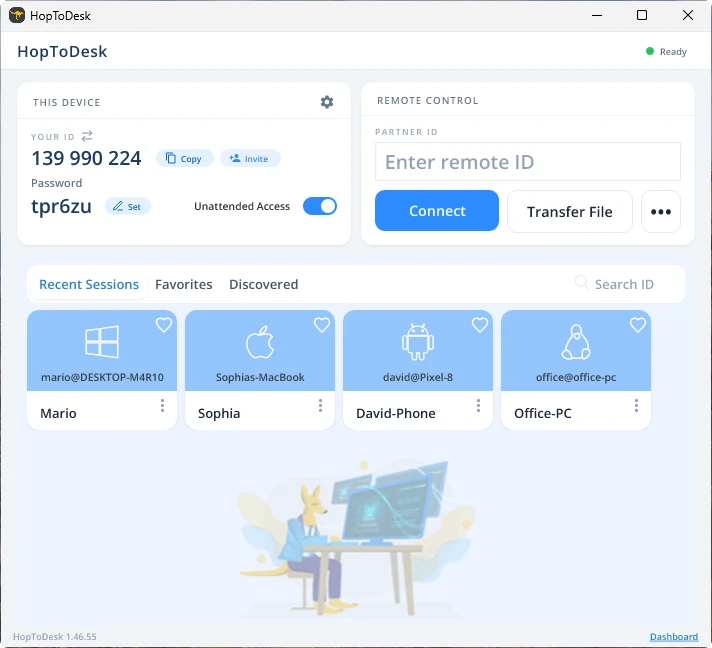
Tu dispositivo establecerá entonces una conexión segura con el otro dispositivo asociado a ese ID. Una vez conectado, puedes aceptar manualmente la conexión desde el otro dispositivo u omitir ese paso con la contraseña. La contraseña aparece debajo de cada número de ID en la aplicación. Recuerda que necesitarás la contraseña del dispositivo al que accedes. Los ID y las contraseñas concretos pueden guardarse para un acceso más rápido y recibir un apodo.
Una vez establecida la conexión tendrás control remoto sobre ese dispositivo. El dispositivo de la conexión saliente se mostrará como una ventana en el tuyo. Puedes acercar o alejar la imagen con las opciones de la parte superior de la ventana de conexión para ver mejor. La opción de transferencia de archivos también permite intercambiar archivos entre los dispositivos con facilidad.
En HopToDesk nuestro objetivo es ser el software de escritorio remoto más seguro y accesible que existe. Mejoramos y desarrollamos constantemente y nos encantaría oír a nuestros usuarios: cuéntanos qué necesitas y cómo podemos atenderte mejor.