
Kom igång med HopToDesk
När det gäller att nå sin dator på distans drar sig många tillbaka på grund av bristande nätverkskunskap eller datorvana. Vissa program är ganska tekniska och kräver ändringar i brandväggsinställningar eller portkonfiguration, vilket är för mycket för en vardaglig användare. HopToDesk gör det däremot enkelt, särskilt om du aldrig har använt fjärrskrivbordsprogram förut.
Till att börja med går vi igenom hur du kommer igång med HopToDesk och når vilken enhet som helst var du än är.
HopToDesk har brett plattformsstöd. Välj den plattform du vill använda (Windows, Mac, Android med flera) på startsidan och klicka på nedladdningsknappen. Öppna den nedladdade filen och kör programmet. Upprepa på alla andra enheter du vill nå på distans.
För att göra en utgående anslutning, se till att appen är öppen både på enheten du vill styra och på enheten du styr från. Notera enhetens ID (det unika numret uppe till vänster) och lösenordet. Skriv i din HopToDesk-app in ID:t för enheten du vill nå i rutan Partner-ID och klicka på den blå knappen Anslut.
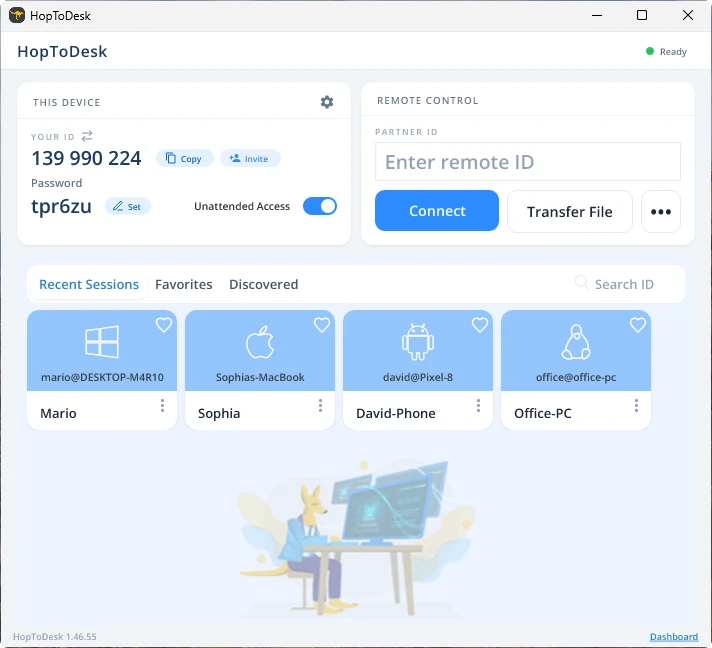
Din enhet upprättar sedan en säker anslutning till den andra enheten som hör till det ID:t. När du är ansluten kan du antingen godkänna anslutningen manuellt från den andra enheten eller hoppa över det steget med lösenordet. Lösenordet står under varje ID-nummer i appen. Kom ihåg att du behöver lösenordet för den enhet du ansluter till. Enskilda enhets-ID och lösenord kan sparas för snabbare åtkomst och ges smeknamn.
När anslutningen är upprättad har du fjärrstyrning över den enheten. Enheten i den utgående anslutningen visas som ett fönster på din enhet. Du kan zooma in och ut via alternativen högst upp i anslutningsfönstret för bättre överblick. Alternativet för filöverföring gör det dessutom enkelt att utbyta filer mellan enheterna.
Hos HopToDesk är vårt mål att vara den säkraste och mest lättillgängliga fjärrskrivbordsprogramvaran som finns. Vi bygger och förbättrar hela tiden och hör gärna från våra användare, så berätta vad du önskar och hur vi kan bli bättre för dig.