
Начало работы с HopToDesk
Когда речь заходит об удалённом доступе к компьютеру, многих останавливает нехватка знаний о сетях или навыков работы с ПК. Некоторые программы довольно технические и требуют менять настройки брандмауэра или портов, что выходит за рамки обычного пользователя. HopToDesk же делает это просто, особенно если вы никогда не пользовались программами удалённого доступа.
Для начала мы покажем, как приступить к работе с HopToDesk и подключаться к любому устройству из любой точки мира.
HopToDesk поддерживает широкий набор платформ. На главном экране выберите нужную платформу (Windows, Mac, Android и другие) и нажмите кнопку загрузки. Откройте скачанный файл и запустите приложение. Повторите это на всех устройствах, к которым хотите подключаться удалённо.
Чтобы установить исходящее соединение, убедитесь, что приложение открыто и на устройстве, которым вы хотите управлять, и на устройстве, с которого будете управлять. Запишите идентификатор устройства (уникальный номер в левом верхнем углу) и пароль. В приложении HopToDesk введите идентификатор нужного устройства в поле «ID партнера» и нажмите синюю кнопку «Подключиться».
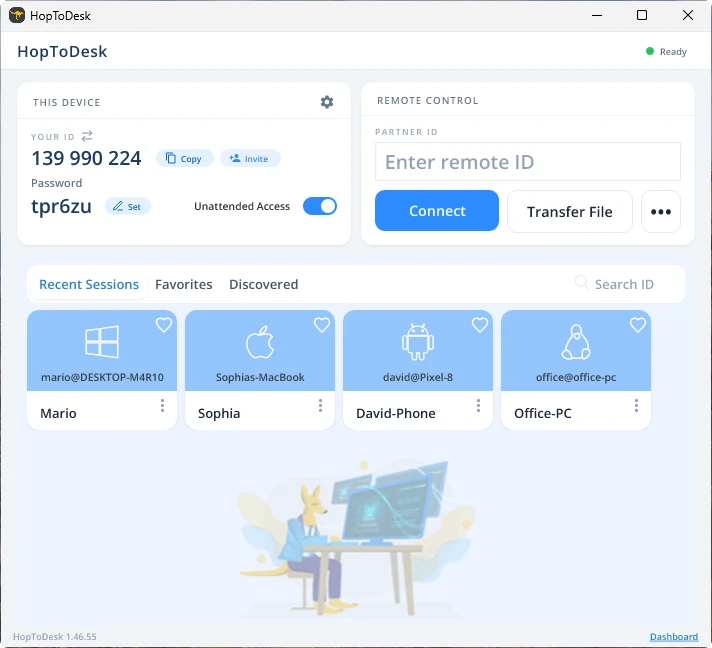
Затем ваше устройство установит защищённое соединение с другим устройством, связанным с этим идентификатором. После подключения вы можете либо вручную принять соединение на другом устройстве, либо пропустить этот шаг, указав пароль. Пароль находится в приложении под каждым номером идентификатора. Помните, что вам нужен пароль устройства, к которому вы подключаетесь. Отдельные идентификаторы устройств и пароли можно сохранить для более быстрого доступа и дать им названия.
После установления соединения вы получите удалённое управление этим устройством. Устройство исходящего соединения отобразится окном на вашем устройстве. Для удобства просмотра можно приближать и отдалять изображение с помощью параметров в верхней части окна соединения. Функция передачи файлов также позволяет легко обмениваться файлами между устройствами.
В HopToDesk наша цель - быть самым безопасным и доступным ПО для удалённого доступа. Мы постоянно развиваем и улучшаем продукт и будем рады услышать наших пользователей: расскажите, чего вы хотите и как мы можем служить вам лучше.