
Ξεκινώντας με το HopToDesk
Όταν πρόκειται για απομακρυσμένη πρόσβαση στον υπολογιστή σας, πολλοί υποψήφιοι χρήστες διστάζουν λόγω έλλειψης γνώσεων δικτύων ή δεξιοτήτων. Ορισμένες εφαρμογές είναι αρκετά τεχνικές και απαιτούν αλλαγές στο τείχος προστασίας ή στη διαμόρφωση θυρών, πράγμα που ξεπερνά τον καθημερινό χρήστη. Το HopToDesk όμως το κάνει εύκολο, ειδικά αν δεν έχετε ξαναχρησιμοποιήσει λογισμικό απομακρυσμένης επιφάνειας εργασίας.
Αρχικά, θα σας δείξουμε πώς να ξεκινήσετε με το HopToDesk και να συνδέεστε σε οποιαδήποτε συσκευή από οπουδήποτε στον κόσμο.
Το HopToDesk προσφέρει ευρεία συμβατότητα πλατφορμών. Στην αρχική οθόνη επιλέξτε την πλατφόρμα (Windows, Mac, Android κ.ά.) που θέλετε και πατήστε το κουμπί λήψης. Ανοίξτε το αρχείο που κατεβάσατε και εκτελέστε την εφαρμογή. Επαναλάβετε τη διαδικασία σε κάθε άλλη συσκευή στην οποία θέλετε απομακρυσμένη πρόσβαση.
Για να κάνετε εξερχόμενη σύνδεση, βεβαιωθείτε ότι η εφαρμογή είναι ανοιχτή τόσο στη συσκευή που θέλετε να ελέγξετε όσο και σε αυτήν από την οποία θα ελέγχετε. Σημειώστε το αναγνωριστικό της συσκευής (τον μοναδικό αριθμό πάνω αριστερά) και τον κωδικό. Στην εφαρμογή HopToDesk, πληκτρολογήστε το αναγνωριστικό της συσκευής στην οποία θέλετε πρόσβαση στο πλαίσιο «Αναγνωριστικό Συνεργάτη» και πατήστε το μπλε κουμπί «Σύνδεση».
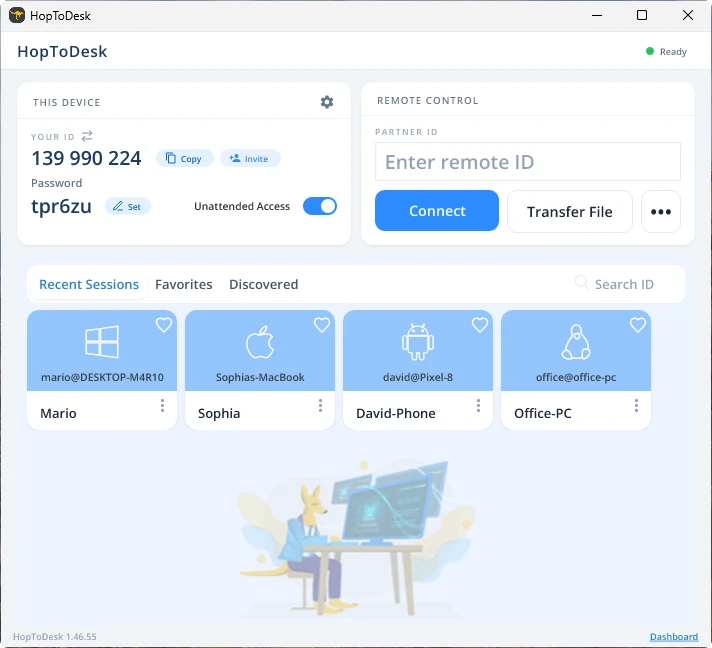
Η συσκευή σας θα δημιουργήσει τότε ασφαλή σύνδεση με την άλλη συσκευή που αντιστοιχεί σε αυτό το αναγνωριστικό. Μόλις συνδεθείτε, μπορείτε είτε να αποδεχτείτε χειροκίνητα τη σύνδεση από την άλλη συσκευή είτε να παρακάμψετε αυτό το βήμα με τον κωδικό. Ο κωδικός βρίσκεται κάτω από κάθε αριθμό αναγνωριστικού στην εφαρμογή. Θυμηθείτε ότι χρειάζεστε τον κωδικό της συσκευής στην οποία συνδέεστε. Συγκεκριμένα αναγνωριστικά και κωδικοί μπορούν να αποθηκευτούν για ταχύτερη πρόσβαση και να πάρουν ψευδώνυμο.
Μόλις αποκατασταθεί η σύνδεση θα έχετε απομακρυσμένο έλεγχο της συσκευής. Η συσκευή της εξερχόμενης σύνδεσης θα εμφανιστεί ως παράθυρο στη δική σας. Μπορείτε να κάνετε μεγέθυνση ή σμίκρυνση από τις επιλογές στο πάνω μέρος του παραθύρου σύνδεσης για καλύτερη προβολή. Η επιλογή μεταφοράς αρχείων επιτρέπει επίσης εύκολη ανταλλαγή αρχείων μεταξύ των συσκευών.
Στο HopToDesk στόχος μας είναι να είμαστε το πιο ασφαλές και εύκολα προσβάσιμο λογισμικό απομακρυσμένης επιφάνειας εργασίας. Εξελισσόμαστε και βελτιωνόμαστε συνεχώς και θα θέλαμε πολύ να ακούσουμε τους χρήστες μας: πείτε μας τι θέλετε και πώς μπορούμε να σας εξυπηρετήσουμε καλύτερα.