
Primeiros passos com o HopToDesk
Quando se trata de acessar o computador remotamente, muitos usuários em potencial ficam intimidados pela falta de conhecimento de redes ou de informática. Existem aplicativos bastante técnicos, que exigem mudar configurações de firewall ou de portas, algo além do usuário do dia a dia. O HopToDesk, porém, facilita, principalmente se você nunca usou um software de área de trabalho remota.
Para começar, vamos orientar você sobre como usar o HopToDesk e acessar qualquer dispositivo de qualquer lugar do mundo.
O HopToDesk oferece ampla compatibilidade de plataformas. Na tela inicial, escolha a plataforma (Windows, Mac, Android e outras) que deseja usar e clique no botão de download. Abra o arquivo baixado e execute o aplicativo. Repita o processo em todos os outros dispositivos que quiser acessar remotamente.
Para fazer uma conexão de saída, verifique se o aplicativo está aberto no dispositivo que você quer controlar e no dispositivo a partir do qual você vai controlar. Anote o ID do dispositivo (número único no canto superior esquerdo) e a senha. No seu aplicativo HopToDesk, digite o ID do dispositivo que deseja acessar no campo ID do Parceiro e clique no botão azul Conectar.
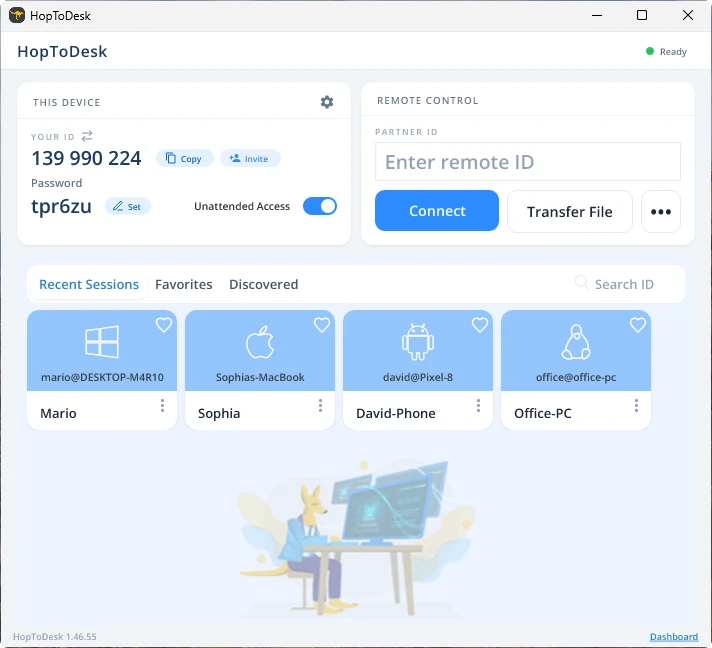
Seu dispositivo então fará uma conexão segura com o outro dispositivo associado àquele ID. Uma vez conectado, você pode aceitar manualmente a conexão a partir do outro dispositivo ou dispensar essa etapa com a senha. A senha fica abaixo de cada número de ID no aplicativo. Lembre-se de que você precisará da senha do dispositivo que está acessando. IDs e senhas específicos podem ser salvos para acesso mais rápido e receber apelidos.
Assim que a conexão for estabelecida, você terá controle remoto sobre aquele dispositivo. O dispositivo da conexão de saída aparecerá como uma janela no seu dispositivo. Você pode ampliar ou reduzir pelas opções no topo da janela de conexão para visualizar melhor. A opção de transferência de arquivos também permite trocar arquivos entre os dispositivos com facilidade.
Na HopToDesk, nosso objetivo é ser o software de área de trabalho remota mais seguro e acessível que existe. Estamos sempre desenvolvendo e melhorando e adoraríamos ouvir nossos usuários: diga o que você deseja e como podemos atendê-lo melhor.