
HopToDesk ile başlarken
Bilgisayarına uzaktan erişme konusunda birçok olası kullanıcı, ağ bilgisi ya da bilgisayar becerisi eksikliği nedeniyle çekiniyor. Bazı uygulamalar oldukça teknik olup güvenlik duvarı ayarlarında veya bağlantı noktası yapılandırmasında değişiklik gerektirir; bu da günlük kullanıcının bilgisini aşar. HopToDesk ise bunu kolaylaştırır, özellikle daha önce hiç uzak masaüstü yazılımı kullanmadıysanız.
Başlangıç olarak, HopToDesk'i kullanmaya başlamayı ve dünyanın her yerinden herhangi bir cihaza erişmeyi adım adım anlatacağız.
HopToDesk geniş platform desteği sunar. Ana ekranda kullanmak istediğiniz platformu (Windows, Mac, Android ve diğerleri) seçip indirme düğmesine tıklayın. İndirilen dosyayı açıp uygulamayı çalıştırın. Uzaktan erişmek istediğiniz diğer cihazlarda da aynı adımları tekrarlayın.
Giden bir bağlantı kurmak için, hem denetlemek istediğiniz cihazda hem de denetimi yapacağınız cihazda uygulamanın açık olduğundan emin olun. Cihaz kimliğini (sol üst köşedeki benzersiz numara) ve parolayı not edin. HopToDesk uygulamanızda, erişmek istediğiniz cihazın kimliğini Ortak Kimliği kutusuna yazın ve mavi Bağlan düğmesine tıklayın.
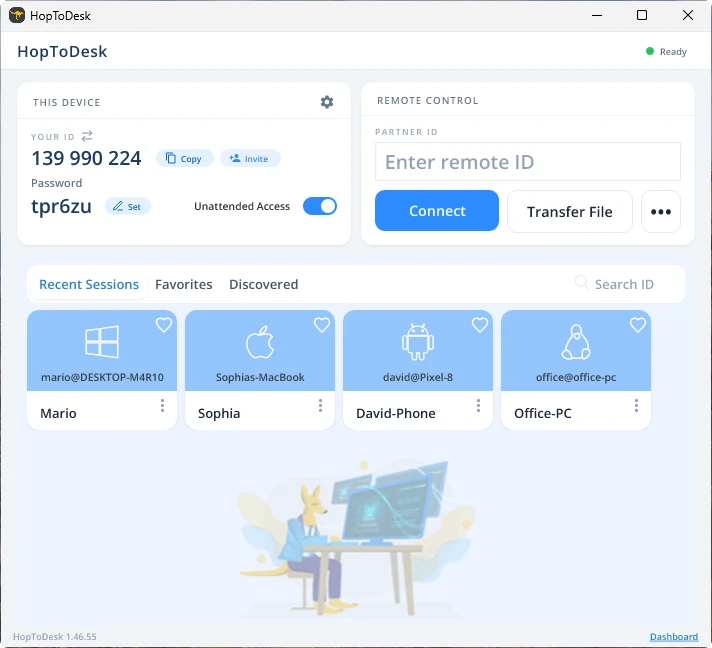
Cihazınız daha sonra o kimliğe bağlı diğer cihazla güvenli bir bağlantı kurar. Bağlandıktan sonra bağlantıyı diğer cihazdan elle kabul edebilir ya da parolayla bu adımı atlayabilirsiniz. Parola, uygulamada her kimlik numarasının altında yer alır. Eriştiğiniz cihazın parolasına ihtiyaç duyacağınızı unutmayın. Belirli cihaz kimlikleri ve parolalar daha hızlı erişim için kaydedilebilir ve takma ad verilebilir.
Bağlantı kurulduğunda o cihaz üzerinde uzaktan denetime sahip olursunuz. Giden bağlantının cihazı, sizin cihazınızda bir pencere olarak görünür. Daha iyi görmek için bağlantı penceresinin üstündeki seçeneklerle yakınlaştırıp uzaklaştırabilirsiniz. Dosya aktarımı seçeneği de cihazlar arasında dosya alışverişini kolaylaştırır.
HopToDesk olarak amacımız, en güvenli ve en kolay erişilebilir uzak masaüstü yazılımı olmaktır. Sürekli geliştirip iyileştiriyoruz ve kullanıcılarımızdan haber almak isteriz; ne istediğinizi ve size nasıl daha iyi hizmet edebileceğimizi bize bildirin.