
HopToDesk 시작하기
컴퓨터에 원격으로 접속하려 할 때 네트워크 지식이나 컴퓨터 사용 능력이 부족해 망설이는 분이 많습니다. 어떤 프로그램은 상당히 기술적이어서 방화벽 설정이나 포트 구성을 바꿔야 하는데, 이는 일반 사용자에게는 어려운 일입니다. HopToDesk는 이 과정을 쉽게 만들어 주며, 원격 데스크톱 소프트웨어를 처음 쓰는 경우에도 마찬가지입니다.
시작에 앞서 HopToDesk 사용법과 전 세계 어디서든 원하는 기기에 접속하는 방법을 안내해 드리겠습니다.
HopToDesk는 다양한 플랫폼을 지원합니다. 홈 화면에서 사용할 플랫폼(Windows, Mac, Android 등)을 선택하고 다운로드 버튼을 클릭하세요. 내려받은 파일을 열어 앱을 실행합니다. 원격으로 접속하려는 다른 기기에서도 같은 과정을 반복하세요.
발신 연결을 하려면 제어하려는 기기와 제어에 사용할 기기 모두에서 앱이 열려 있는지 확인하세요. 기기 ID(왼쪽 상단의 고유 번호)와 비밀번호를 적어 둡니다. HopToDesk 앱에서 접속하려는 기기의 ID를 '파트너 ID' 입력란에 입력한 다음 파란색 '연결하기' 버튼을 클릭하세요.
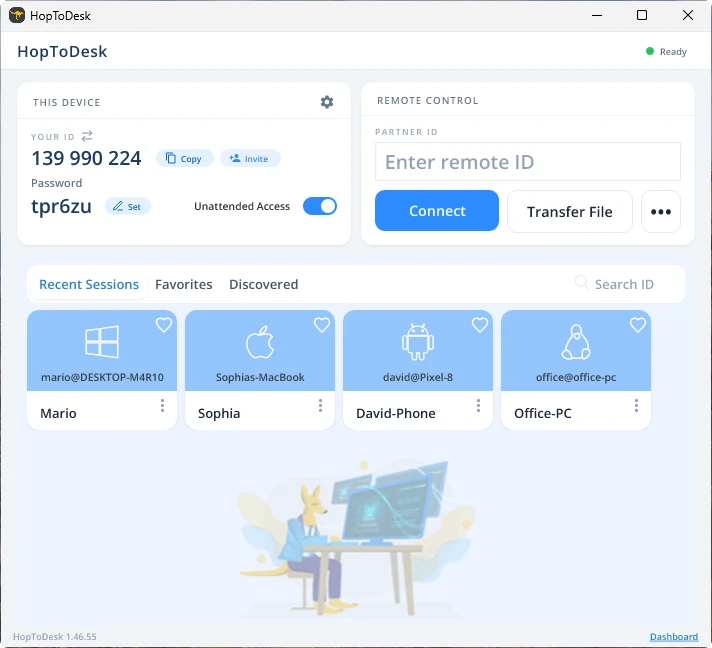
그러면 기기가 해당 ID에 연결된 다른 기기와 보안 연결을 설정합니다. 연결된 후에는 다른 기기에서 수동으로 연결을 수락하거나 비밀번호로 이 단계를 건너뛸 수 있습니다. 비밀번호는 앱의 각 ID 번호 아래에 있습니다. 접속하려는 기기의 비밀번호가 필요하다는 점을 기억하세요. 특정 기기 ID와 비밀번호는 더 빠른 접속을 위해 저장하고 별칭을 지정할 수 있습니다.
연결이 이루어지면 해당 기기를 원격으로 제어할 수 있습니다. 발신 연결된 기기는 사용 중인 기기에 창으로 표시됩니다. 더 잘 보려면 연결 창 상단의 옵션으로 확대하거나 축소할 수 있습니다. 파일 전송 옵션을 사용하면 두 기기 사이에서 파일을 손쉽게 주고받을 수도 있습니다.
HopToDesk의 목표는 가장 안전하고 접근하기 쉬운 원격 데스크톱 소프트웨어가 되는 것입니다. 저희는 끊임없이 개발하고 개선하고 있으며 사용자 여러분의 의견을 듣고 싶습니다. 무엇을 원하시는지, 어떻게 하면 더 잘 도와드릴 수 있을지 알려주세요.