
Guida introduttiva a HopToDesk
Quando si tratta di accedere al computer da remoto, molti potenziali utenti si sentono intimiditi per la mancanza di conoscenze di rete o informatiche. Alcune applicazioni sono piuttosto tecniche e richiedono modifiche al firewall o alla configurazione delle porte, oltre le competenze dell'utente comune. HopToDesk invece rende tutto semplice, soprattutto se non hai mai usato un software di desktop remoto.
Per iniziare, ti guideremo passo dopo passo nell'uso di HopToDesk e nell'accesso a qualsiasi dispositivo da ogni parte del mondo.
HopToDesk offre un'ampia compatibilità tra piattaforme. Nella schermata iniziale scegli la piattaforma (Windows, Mac, Android e altre) che vuoi usare e fai clic sul pulsante di download. Apri il file scaricato ed esegui l'applicazione. Ripeti la procedura su ogni altro dispositivo a cui vuoi accedere da remoto.
Per stabilire una connessione in uscita, assicurati che l'app sia aperta sul dispositivo che vuoi controllare e su quello da cui controllerai. Annota l'ID del dispositivo (il numero univoco in alto a sinistra) e la password. Nella tua app HopToDesk, digita l'ID del dispositivo a cui vuoi accedere nella casella ID Partner e premi il pulsante blu Connetti.
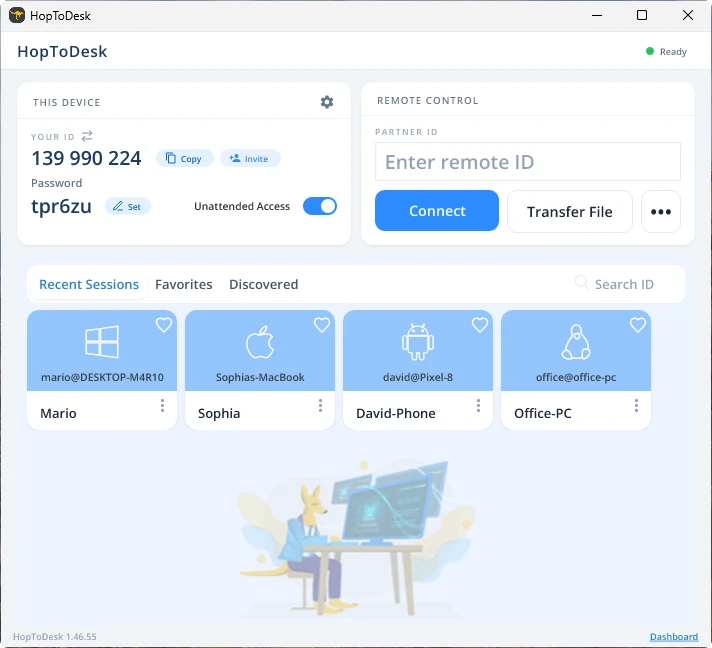
Il tuo dispositivo stabilirà quindi una connessione sicura con l'altro dispositivo associato a quell'ID. Una volta collegato puoi accettare manualmente la connessione dall'altro dispositivo oppure saltare questo passaggio con la password. La password si trova sotto ogni numero di ID nell'app. Ricorda che ti servirà la password del dispositivo a cui accedi. ID e password specifici possono essere salvati per un accesso più rapido e ricevere un soprannome.
Una volta stabilita la connessione avrai il controllo remoto di quel dispositivo. Il dispositivo della connessione in uscita apparirà come una finestra sul tuo. Puoi ingrandire o ridurre con le opzioni in alto nella finestra di connessione per vedere meglio. Anche l'opzione di trasferimento file permette di scambiare facilmente file tra i dispositivi.
In HopToDesk il nostro obiettivo è essere il software di desktop remoto più sicuro e accessibile in circolazione. Sviluppiamo e miglioriamo di continuo e ci farebbe piacere sentire i nostri utenti: dicci cosa desideri e come possiamo servirti meglio.