
Pierwsze kroki z HopToDesk
Jeśli chodzi o zdalny dostęp do komputera, wielu potencjalnych użytkowników zniechęca brak wiedzy o sieciach lub umiejętności komputerowych. Niektóre aplikacje są dość techniczne i wymagają zmian w ustawieniach zapory lub konfiguracji portów, co przekracza możliwości codziennego użytkownika. HopToDesk jednak to ułatwia, zwłaszcza jeśli nigdy wcześniej nie korzystałeś z oprogramowania do zdalnego pulpitu.
Na początek pokażemy Ci krok po kroku, jak zacząć korzystać z HopToDesk i uzyskać dostęp do dowolnego urządzenia z każdego miejsca na świecie.
HopToDesk obsługuje szeroką gamę platform. Na ekranie głównym wybierz platformę (Windows, Mac, Android i inne), której chcesz użyć, i kliknij przycisk pobierania. Otwórz pobrany plik i uruchom aplikację. Powtórz to na każdym innym urządzeniu, do którego chcesz mieć zdalny dostęp.
Aby nawiązać połączenie wychodzące, upewnij się, że aplikacja jest otwarta na urządzeniu, którym chcesz sterować, i na tym, z którego będziesz sterować. Zanotuj identyfikator urządzenia (unikatowy numer w lewym górnym rogu) oraz hasło. W aplikacji HopToDesk wpisz identyfikator urządzenia, do którego chcesz się połączyć, w polu Identyfikator partnera i kliknij niebieski przycisk Połącz.
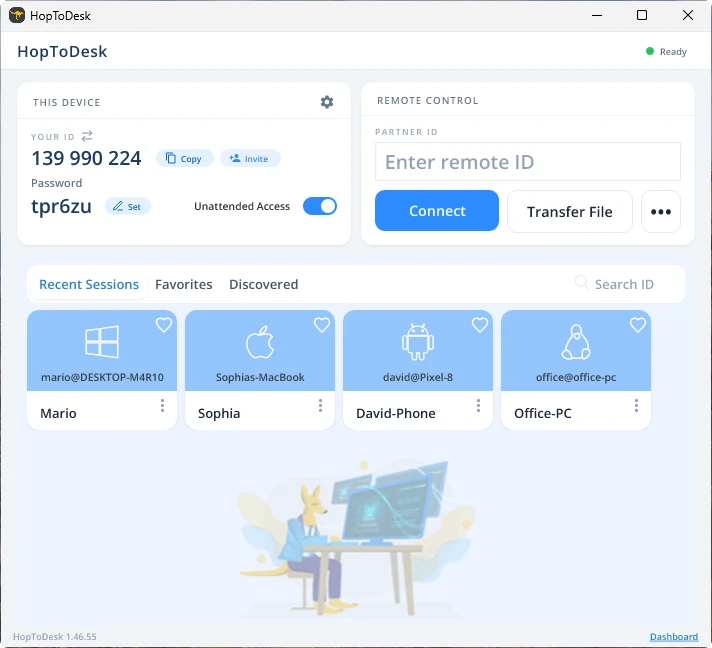
Twoje urządzenie nawiąże wtedy bezpieczne połączenie z drugim urządzeniem powiązanym z tym identyfikatorem. Po połączeniu możesz ręcznie zaakceptować je na drugim urządzeniu albo pominąć ten krok, podając hasło. Hasło znajduje się pod każdym numerem identyfikatora w aplikacji. Pamiętaj, że potrzebujesz hasła urządzenia, do którego się łączysz. Wybrane identyfikatory i hasła można zapisać dla szybszego dostępu i nadać im nazwy.
Po nawiązaniu połączenia uzyskasz zdalną kontrolę nad tym urządzeniem. Urządzenie połączenia wychodzącego pojawi się jako okno na Twoim urządzeniu. Dla lepszej widoczności możesz przybliżać i oddalać obraz opcjami u góry okna połączenia. Opcja przesyłania plików pozwala też łatwo wymieniać pliki między urządzeniami.
W HopToDesk naszym celem jest bycie najbezpieczniejszym i najłatwiej dostępnym oprogramowaniem do zdalnego pulpitu. Stale rozwijamy i ulepszamy produkt i chętnie usłyszymy naszych użytkowników, więc daj nam znać, czego potrzebujesz i jak możemy lepiej Ci służyć.