
Erste Schritte mit HopToDesk
Beim Fernzugriff auf den eigenen Computer schrecken viele Interessenten zurück, weil ihnen Netzwerkkenntnisse oder Computererfahrung fehlen. Manche Anwendungen sind recht technisch und erfordern Änderungen an Firewall-Einstellungen oder Portkonfigurationen, die über das Können alltäglicher Nutzer hinausgehen. HopToDesk macht es dagegen einfach, gerade wenn Sie noch nie Remote-Desktop-Software verwendet haben.
Zum Einstieg zeigen wir Ihnen Schritt für Schritt, wie Sie HopToDesk nutzen und von überall auf der Welt auf jedes Gerät zugreifen.
HopToDesk unterstützt eine große Bandbreite an Plattformen. Wählen Sie auf der Startseite die gewünschte Plattform (Windows, Mac, Android und weitere) und klicken Sie auf die Download-Schaltfläche. Öffnen Sie die heruntergeladene Datei und starten Sie die Anwendung. Wiederholen Sie das auf allen weiteren Geräten, auf die Sie aus der Ferne zugreifen möchten.
Für eine ausgehende Verbindung achten Sie darauf, dass die App sowohl auf dem Gerät geöffnet ist, das Sie steuern möchten, als auch auf dem Gerät, von dem aus Sie steuern. Notieren Sie die Geräte-ID (die eindeutige Nummer oben links) und das Passwort. Geben Sie in Ihrer HopToDesk-App die ID des gewünschten Geräts in das Feld „Partner-ID“ ein und klicken Sie auf die blaue Schaltfläche „Verbinden“.
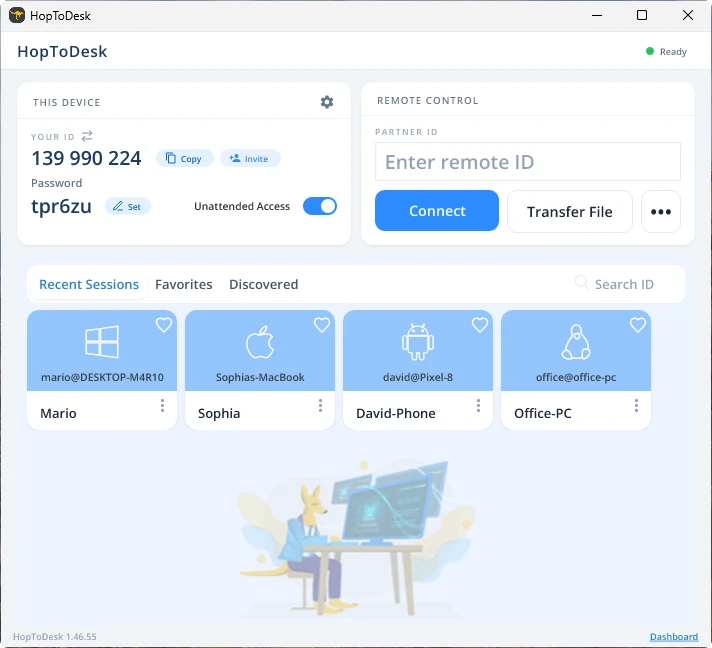
Ihr Gerät stellt dann eine sichere Verbindung zu dem anderen Gerät her, das dieser ID zugeordnet ist. Nach dem Verbinden können Sie die Verbindung am anderen Gerät manuell annehmen oder diesen Schritt mit dem Passwort überspringen. Das Passwort steht in der App unter der jeweiligen ID-Nummer. Denken Sie daran, dass Sie das Passwort des Geräts benötigen, auf das Sie zugreifen. Bestimmte Geräte-IDs und Passwörter lassen sich für schnelleren Zugriff speichern und mit einem Spitznamen versehen.
Sobald die Verbindung steht, haben Sie die Fernsteuerung über dieses Gerät. Das Gerät der ausgehenden Verbindung erscheint als Fenster auf Ihrem Gerät. Über die Optionen oben im Verbindungsfenster können Sie zur besseren Ansicht hinein- und herauszoomen. Mit der Option zur Dateiübertragung lassen sich außerdem bequem Dateien zwischen den Geräten austauschen.
Bei HopToDesk ist es unser Ziel, die sicherste und am leichtesten zugängliche Remote-Desktop-Software zu sein. Wir entwickeln und verbessern laufend und hören gern von unseren Nutzern: Sagen Sie uns, was Sie sich wünschen und wie wir Ihnen besser dienen können.