
Premiers pas avec HopToDesk
Quand il s'agit d'accéder à son ordinateur à distance, beaucoup d'utilisateurs potentiels hésitent par manque de connaissances en réseau ou en informatique. Certaines applications sont assez techniques et demandent de modifier le pare-feu ou la configuration des ports, ce qui dépasse l'utilisateur courant. HopToDesk, lui, simplifie les choses, surtout si vous n'avez jamais utilisé de logiciel de bureau à distance.
Pour commencer, nous vous guidons pas à pas pour utiliser HopToDesk et accéder à n'importe quel appareil depuis n'importe où dans le monde.
HopToDesk offre une large compatibilité de plateformes. Sur l'écran d'accueil, choisissez la plateforme (Windows, Mac, Android, etc.) souhaitée et cliquez sur le bouton de téléchargement. Ouvrez le fichier téléchargé et lancez l'application. Répétez l'opération sur les autres appareils auxquels vous voulez accéder à distance.
Pour établir une connexion sortante, assurez-vous que l'application est ouverte sur l'appareil que vous voulez contrôler et sur celui depuis lequel vous allez contrôler. Notez l'identifiant de l'appareil (le numéro unique en haut à gauche) et le mot de passe. Dans votre application HopToDesk, saisissez l'identifiant de l'appareil auquel vous voulez accéder dans le champ « ID partenaire », puis cliquez sur le bouton bleu « Se connecter ».
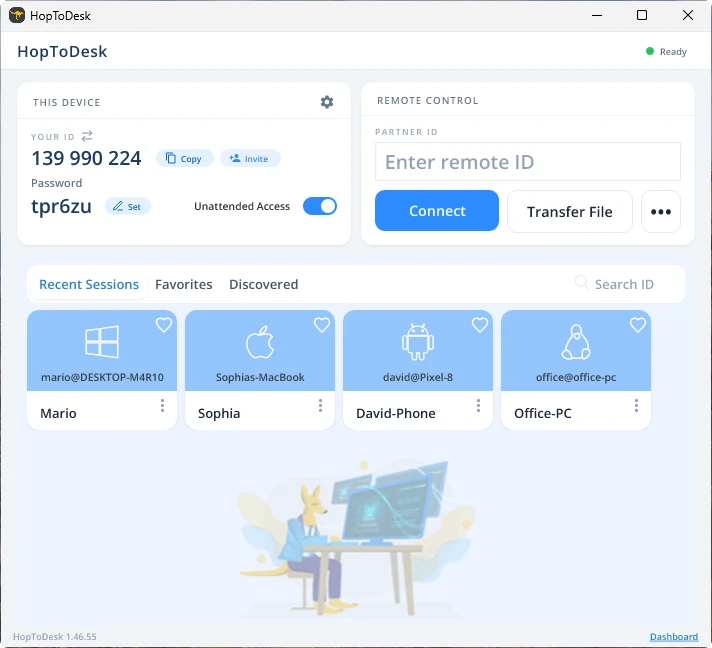
Votre appareil établit alors une connexion sécurisée avec l'autre appareil associé à cet identifiant. Une fois connecté, vous pouvez accepter manuellement la connexion depuis l'autre appareil ou passer cette étape grâce au mot de passe. Le mot de passe se trouve sous chaque numéro d'identifiant dans l'application. N'oubliez pas qu'il vous faut le mot de passe de l'appareil auquel vous accédez. Des identifiants et mots de passe précis peuvent être enregistrés pour un accès plus rapide et recevoir un surnom.
Une fois la connexion établie, vous prenez le contrôle à distance de cet appareil. L'appareil de la connexion sortante s'affiche comme une fenêtre sur le vôtre. Vous pouvez zoomer ou dézoomer via les options en haut de la fenêtre de connexion pour mieux voir. L'option de transfert de fichiers permet aussi d'échanger facilement des fichiers entre les appareils.
Chez HopToDesk, notre objectif est d'être le logiciel de bureau à distance le plus sûr et le plus accessible. Nous développons et améliorons en continu et nous serions ravis d'entendre nos utilisateurs : dites-nous ce que vous souhaitez et comment mieux vous servir.