
Aan de slag met HopToDesk
Als het gaat om toegang op afstand tot uw computer, haken veel potentiële gebruikers af door een gebrek aan netwerkkennis of computervaardigheid. Sommige toepassingen zijn behoorlijk technisch en vragen om aanpassingen aan de firewall of poortconfiguratie, wat de dagelijkse gebruiker te boven gaat. HopToDesk maakt het juist eenvoudig, zeker als u nog nooit software voor extern bureaublad hebt gebruikt.
Om te beginnen laten we u stap voor stap zien hoe u HopToDesk gebruikt en overal ter wereld toegang krijgt tot elk apparaat.
HopToDesk ondersteunt een breed scala aan platformen. Kies op het beginscherm het gewenste platform (Windows, Mac, Android en meer) en klik op de downloadknop. Open het gedownloade bestand en start de toepassing. Herhaal dit op elk ander apparaat dat u op afstand wilt bereiken.
Zorg voor een uitgaande verbinding dat de app open staat op het apparaat dat u wilt bedienen én op het apparaat waarvandaan u bedient. Noteer de apparaat-ID (het unieke nummer linksboven) en het wachtwoord. Typ in uw HopToDesk-app de ID van het gewenste apparaat in het vak Partner ID en klik op de blauwe knop Verbinden.
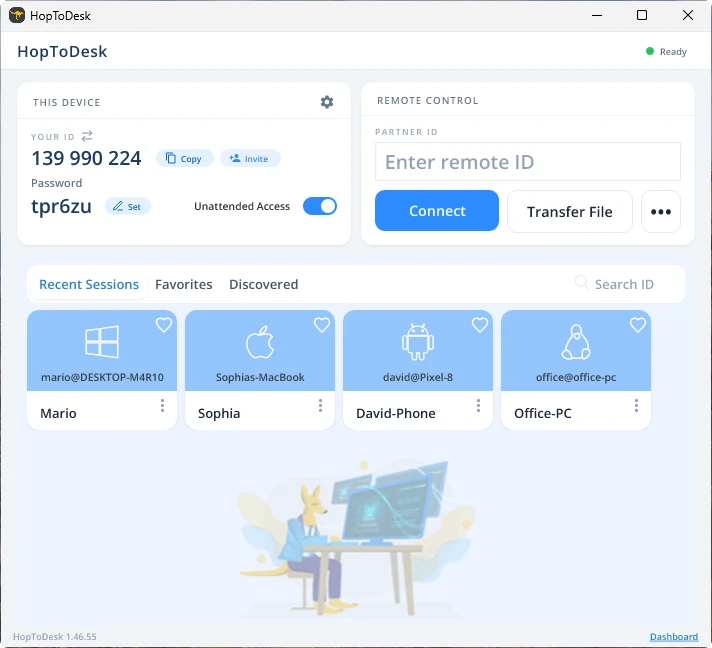
Uw apparaat maakt dan een beveiligde verbinding met het andere apparaat dat bij die ID hoort. Zodra u verbonden bent, kunt u de verbinding handmatig accepteren op het andere apparaat of die stap overslaan met het wachtwoord. Het wachtwoord staat in de app onder elk ID-nummer. Denk eraan dat u het wachtwoord nodig hebt van het apparaat waartoe u toegang zoekt. Specifieke apparaat-ID's en wachtwoorden kunt u opslaan voor snellere toegang en van een bijnaam voorzien.
Zodra de verbinding tot stand is gekomen hebt u bediening op afstand over dat apparaat. Het apparaat van de uitgaande verbinding verschijnt als venster op uw eigen apparaat. Met de opties boven in het verbindingsvenster kunt u in- en uitzoomen om beter te kijken. Met de optie voor bestandsoverdracht wisselt u bovendien eenvoudig bestanden uit tussen de apparaten.
Bij HopToDesk is het ons doel de veiligste en best toegankelijke software voor extern bureaublad te zijn. We bouwen en verbeteren voortdurend en horen graag van onze gebruikers: laat ons weten wat u wilt en hoe we u beter van dienst kunnen zijn.