
Първи стъпки с HopToDesk
Когато става дума за отдалечен достъп до компютъра, много потенциални потребители се притесняват заради липса на познания за мрежи или компютърни умения. Някои приложения са доста технични и изискват промени в защитната стена или конфигурация на портове, което надхвърля уменията на ежедневния потребител. HopToDesk обаче го улеснява, особено ако никога не сте използвали софтуер за отдалечен работен плот.
За начало ще ви преведем през стъпките за използване на HopToDesk и достъп до всяко устройство отвсякъде по света.
HopToDesk предлага широка съвместимост с платформи. На началния екран изберете платформата (Windows, Mac, Android и др.), която искате да използвате, и щракнете върху бутона за изтегляне. Отворете изтегления файл и стартирайте приложението. Повторете това на всяко друго устройство, до което искате отдалечен достъп.
За да направите изходяща връзка, уверете се, че приложението е отворено както на устройството, което искате да управлявате, така и на устройството, от което ще управлявате. Отбележете идентификатора на устройството (уникалния номер в горния ляв ъгъл) и паролата. В приложението HopToDesk въведете идентификатора на устройството, до което искате да достъпите, в полето „ID на партньор“ и щракнете върху синия бутон „Свързване“.
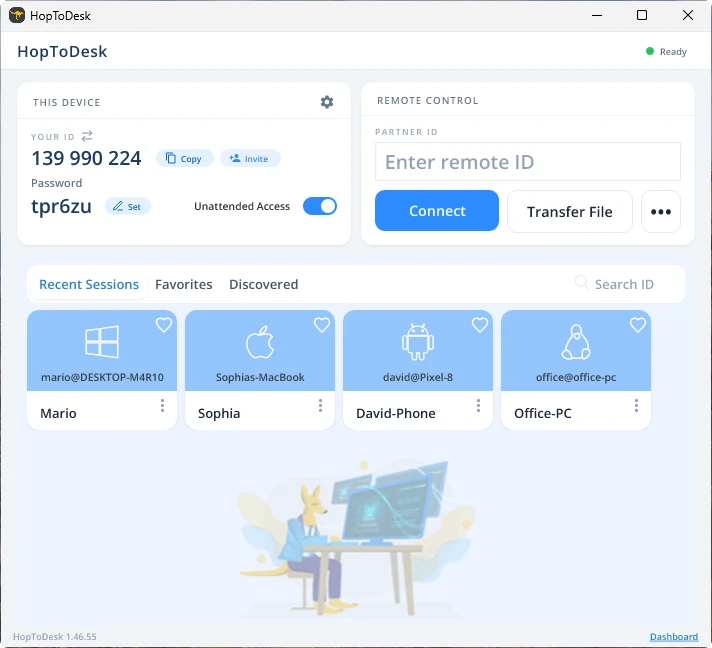
След това вашето устройство ще осъществи защитена връзка с другото устройство, свързано с този идентификатор. След свързването може или ръчно да приемете връзката от другото устройство, или да пропуснете тази стъпка с паролата. Паролата се намира под всеки номер на идентификатор в приложението. Помнете, че ще ви трябва паролата на устройството, до което достъпвате. Конкретни идентификатори на устройства и пароли може да се запазят за по-бърз достъп и да получат прякори.
След като връзката бъде установена, ще имате отдалечено управление върху това устройство. Устройството на изходящата връзка ще се покаже като прозорец на вашето устройство. За по-добра видимост може да увеличавате и намалявате чрез опциите в горната част на прозореца на връзката. Опцията за прехвърляне на файлове също позволява лесно да обменяте файлове между устройствата.
В HopToDesk целта ни е да бъдем най-сигурният и най-лесно достъпен софтуер за отдалечен работен плот. Непрекъснато развиваме и подобряваме продукта и с радост ще чуем мнението ви, така че ни кажете какво искате и как можем да ви обслужим по-добре.