
Kom i gang med HopToDesk
Når det gjelder å nå datamaskinen sin eksternt, kvier mange potensielle brukere seg fordi de mangler nettverkskunnskap eller datakunnskap. Enkelte programmer er ganske tekniske og krever endringer i brannmurinnstillinger eller portoppsett, noe som er utenfor rekkevidde for vanlige brukere. HopToDesk gjør det derimot enkelt, særlig hvis du aldri har brukt fjernskrivebordsprogramvare før.
Til å begynne med viser vi deg hvordan du kommer i gang med HopToDesk og når enhver enhet fra hvor som helst i verden.
HopToDesk støtter et bredt spekter av plattformer. På startskjermen velger du plattformen (Windows, Mac, Android med flere) du vil bruke, og klikker på nedlastingsknappen. Åpne den nedlastede filen og kjør programmet. Gjenta dette på alle andre enheter du vil nå eksternt.
For å opprette en utgående tilkobling må appen være åpen både på enheten du vil styre og på enheten du styrer fra. Noter enhetens ID (det unike nummeret øverst til venstre) og passordet. I HopToDesk-appen skriver du inn ID-en til enheten du vil nå i feltet Partner-ID, og klikker på den blå knappen Koble til.
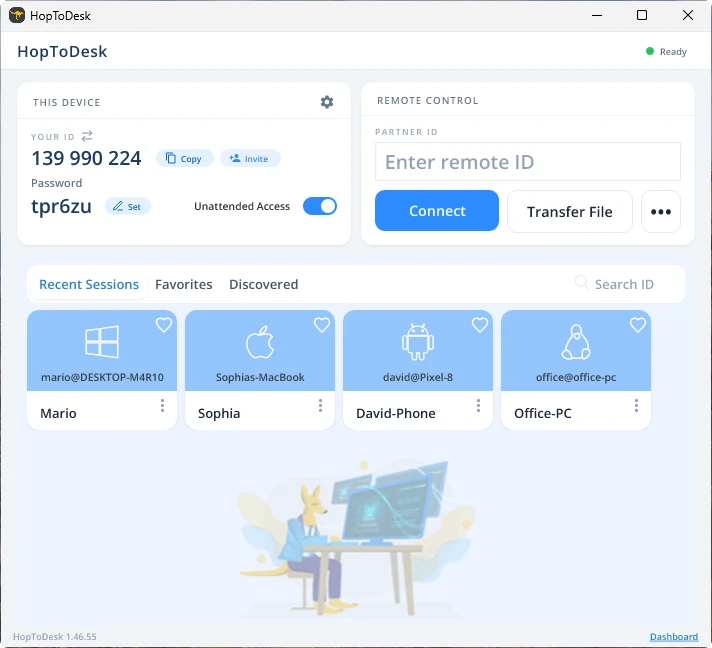
Enheten din oppretter så en sikker tilkobling til den andre enheten som hører til den ID-en. Når du er tilkoblet, kan du enten godta tilkoblingen manuelt fra den andre enheten eller hoppe over det trinnet med passordet. Passordet står under hvert ID-nummer i appen. Husk at du trenger passordet til enheten du kobler deg til. Bestemte enhets-ID-er og passord kan lagres for raskere tilgang og gis kallenavn.
Når tilkoblingen er opprettet, har du fjernstyring over den enheten. Enheten i den utgående tilkoblingen vises som et vindu på din egen enhet. Du kan zoome inn og ut via valgene øverst i tilkoblingsvinduet for bedre oversikt. Alternativet for filoverføring gjør det også enkelt å utveksle filer mellom enhetene.
Hos HopToDesk er målet vårt å være den sikreste og mest tilgjengelige fjernskrivebordsprogramvaren som finnes. Vi bygger og forbedrer kontinuerlig og vil gjerne høre fra brukerne våre, så si fra hva du ønsker og hvordan vi kan betjene deg bedre.