
Bắt đầu với HopToDesk
Khi nói đến việc truy cập máy tính từ xa, nhiều người dùng tiềm năng e ngại vì thiếu kiến thức mạng hoặc kỹ năng máy tính. Một số ứng dụng khá kỹ thuật, đòi hỏi thay đổi cài đặt tường lửa hoặc cấu hình cổng, vượt quá khả năng của người dùng thông thường. Tuy nhiên, HopToDesk giúp việc này trở nên dễ dàng, nhất là khi bạn chưa từng dùng phần mềm điều khiển từ xa.
Để bắt đầu, chúng tôi sẽ hướng dẫn bạn cách sử dụng HopToDesk và truy cập bất kỳ thiết bị nào từ mọi nơi trên thế giới.
HopToDesk hỗ trợ nhiều nền tảng. Trên màn hình chính, chọn nền tảng bạn muốn dùng (Windows, Mac, Android và các nền tảng khác) rồi bấm nút tải xuống. Mở tệp đã tải và chạy ứng dụng. Lặp lại các bước này trên mọi thiết bị khác mà bạn muốn truy cập từ xa.
Để tạo kết nối đi, hãy đảm bảo ứng dụng đang mở trên cả thiết bị bạn muốn điều khiển lẫn thiết bị bạn dùng để điều khiển. Ghi lại ID thiết bị (số duy nhất ở góc trên bên trái) và mật khẩu. Trong ứng dụng HopToDesk, nhập ID của thiết bị bạn muốn truy cập vào ô Mã định danh đối tác, rồi nhấp nút Kết nối màu xanh.
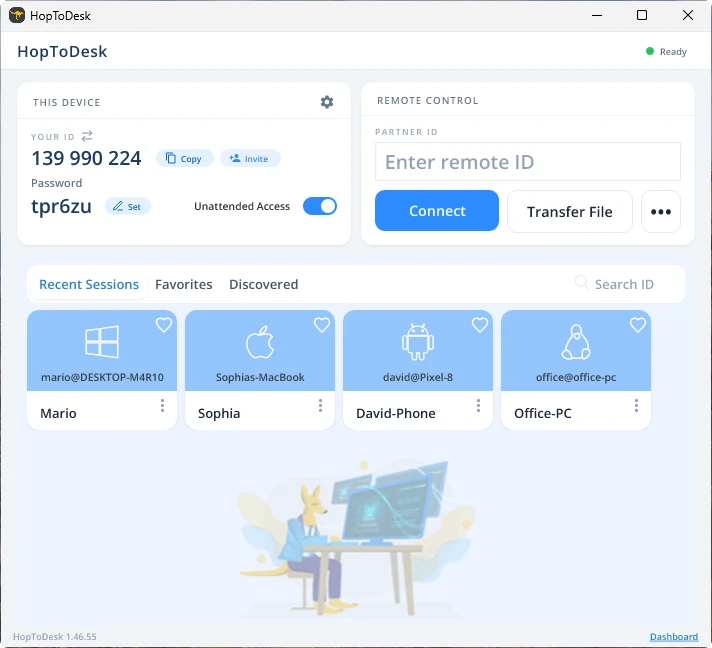
Sau đó, thiết bị của bạn sẽ thiết lập kết nối an toàn với thiết bị kia gắn với ID đó. Sau khi kết nối, bạn có thể chấp nhận thủ công từ thiết bị kia hoặc bỏ qua bước này bằng mật khẩu. Mật khẩu nằm ngay dưới mỗi số ID trong ứng dụng. Hãy nhớ rằng bạn cần mật khẩu của thiết bị mà bạn truy cập. Có thể lưu các ID thiết bị và mật khẩu cụ thể để truy cập nhanh hơn và đặt tên gợi nhớ cho chúng.
Sau khi kết nối được thiết lập, bạn sẽ điều khiển thiết bị đó từ xa. Thiết bị của kết nối đi sẽ hiện ra dưới dạng một cửa sổ trên thiết bị của bạn. Bạn có thể phóng to hoặc thu nhỏ bằng các tùy chọn ở đầu cửa sổ kết nối để xem rõ hơn. Tùy chọn truyền tệp cũng giúp trao đổi tệp giữa hai thiết bị dễ dàng.
Tại HopToDesk, mục tiêu của chúng tôi là trở thành phần mềm điều khiển từ xa an toàn và dễ tiếp cận nhất. Chúng tôi liên tục phát triển và cải tiến, và rất mong nhận được ý kiến từ người dùng: hãy cho chúng tôi biết bạn cần gì và chúng tôi có thể phục vụ bạn tốt hơn ra sao.