
Free Remote Desktop Download
HopToDesk is free remote desktop software for Windows, Mac, Linux, Android, iOS, Raspberry Pi and FreeBSD. Free for personal and business use, with no account needed.
Your download is starting. Open the file to run HopToDesk. You can install it later from inside the app.
Your download is starting. Open the file and drag HopToDesk to Applications. On first start, allow Screen Recording and Accessibility when macOS asks.
Your download is starting. Install the file with your package manager, then open HopToDesk from your apps.
Your download is starting. Open the file on your Android device to install HopToDesk.
Windows
Windows 7, 8, 10 and 11, on 32-bit, 64-bit and ARM64.
macOS
macOS 10.13 or later, on Apple Silicon and Intel.
Linux
64-bit Linux on Intel and AMD processors.
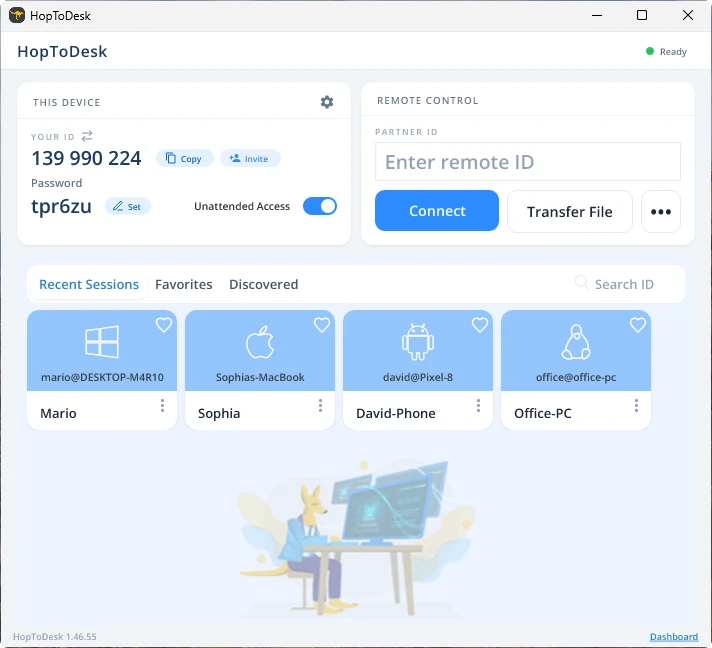
Connect in 3 steps
- Download and open HopToDesk on both devices.
- On the device you want to reach, read the ID and password that HopToDesk shows.
- On your device, type that ID under Partner ID, click Connect, and enter the password.
Why choose HopToDesk
HopToDesk is a remote desktop app and remote access software in one. Control a computer, give remote support, or reach your own PC from anywhere.
Check your download
Each file has a SHA-256 checksum. If the checksum of the file you downloaded matches the one below, you have the real HopToDesk file.
Show SHA-256 checksums
| File | SHA-256 |
|---|---|
| Windows (32-bit) | 11c38b77d9955578eedc9505102300d73ec4e8bb4cbd3f72577452710d91a4c5 |
| Windows (64-bit) | a54cc92535d92c2451a9cf1717ef12c596d9595971366f59aef40983c5e2fb31 |
| Windows (ARM64) | d0cadc8d9b050a773238967512d74bbe3d2ce5470d3b08f9f0f853e4bd4588eb |
| Windows XP / Vista / 2003 | 90ac30fd62d439713bc18f54a252ffb68ddbdf584241f2ff052eaeca7908853f |
| Windows MSIX | df38a31c32c5c1ef970ba8d9aa993a90bd49a9f2fdea6b21c3a3c06cdfac5f69 |
| Windows MSI | 7d171f6e68e038f4f8e95130bc144e4e362b4908aad779cecbe0f420256413fa |
| macOS Apple Silicon | b83eb59dd9ba7b312f0c93ee1b54a7ea69e15d27e7b348dd2ab8aaf62b80fc6a |
| macOS Intel | b83eb59dd9ba7b312f0c93ee1b54a7ea69e15d27e7b348dd2ab8aaf62b80fc6a |
| macOS installer package | a1f3148795dbfed0649f9f8913864d7a2a4f49e362697399f5490c0cb65f4ccb |
| Debian / Ubuntu | 6e0c65a239eb9fb214dbd2c4ef080ac521a216c15aa7b27f3e8f929b63350f9d |
| Fedora / openSUSE | f4647408bd04892e6e118aaddabe437f5068069882b60fac04b7b7816ca0d2ba |
| Manjaro / Arch | e17a2ca1cfe36facc83e70abba9ae1919e8a2799b80048a4d75dd14a40ac53b8 |
| AppImage | 1e11ef8a9ca7d678b286ab1fa25b478a3acf09a41f9831e4bb4b5cdd96841051 |
| Flatpak | 87f73d839ee2513db29c5b960ca1caef5462eac7f4f986b66854dcb8f3b82a57 |
| APK File | b73a2fe69d088f0eec5dd0633f0328de3527a7d74680b95def645202ac542135 |
| Raspberry Pi 64-bit | d721e6e266a6cef9d7fd97a5aff629cebbe16d579bb9e29c6068df1c1bfbd752 |
| FreeBSD amd64 | 344d5404aceda768a36982aa5beadf9a3cfbe42d46a7a15d2096dc3a1aa462a9 |
| FreeBSD aarch64 | c1e7b13c08820cc1c1d472cc48e72272f7b97ee8795c6a962499c74542410f93 |
On Windows, run this command in a terminal: certutil -hashfile HopToDesk.exe SHA256
On Mac and Linux, run this command with the file name: shasum -a 256
Common questions
Is HopToDesk really free?
Yes. The HopToDesk app is free for both personal and business use, with no time limits. You only pay if you choose the Dashboard to manage a larger fleet, which has a free tier plus paid plans for when you need more devices and team features.
Is HopToDesk safe to download?
Yes, when you download it from this page or the official app stores. The Windows and Mac apps are code-signed, and you can check every file against its SHA-256 checksum on this page. Every remote session is end-to-end encrypted.
Do I need to install HopToDesk?
No. On Windows, HopToDesk runs as soon as you open the file, and you can install it later from inside the app. On Mac, drag HopToDesk to your Applications folder.
Do I need an account to connect?
No. HopToDesk connects without an account. An account is only needed for the Dashboard, which is where fleet management, ticketing and reporting live.
Can I connect to a computer when nobody is there?
Yes. Turn on Unattended Access in the app and set a password, and you can connect at any time. To manage many computers, the free Dashboard adds device lists, groups and access control.
Can I use HopToDesk from a web browser?
Yes. Open the web app to control another device from your browser, with nothing to install. The device you connect to needs the HopToDesk app.
Do I need to configure my router or firewall to use HopToDesk?
HopToDesk should simply work and be able to connect to any peer without needing to change any router or firewall settings. Other remote desktop tools such as Windows Remote Desktop and VNC do require setting up port forwarding or opening ports on the router or firewall to allow remote connections to be made, however this is not the case with HopToDesk.